Getting started with MySQL
- Install NuGet package for MySQL
> dotnet add package CA.Blocks.MySQLDataAccess -
Configure your connection string
- Create your DataAccess class Here we use the SimpleConnectionStringDataAccessConfig resolver for simplicity
Example:
// model class
public class MyCustomObject
{
    public required string Name {get; init;}
    public required DateTime CreateDate {get; init;}
    public required string TableType {get; init;}
    public int? RowCount {get; init;}
}
// data access class
public class YourDataAccessClass : MySqlDataAccess
{
    public YourDataAccessClass() :
        base( new SimpleConnectionStringDataAccessConfig("Server=localhost;Database=mydb;Uid=root;Pwd=password;"))
    {
    }

    public async Task<IList<MyCustomObject>> GetMyCustomObjects()
    {
        // Step 1: construct the SQL command
        var sqlCmd = CreateTextCommand(@"
SELECT TABLE_NAME as Name, CREATE_TIME as CreateDate, TABLE_TYPE as TableType, TABLE_ROWS as RowCount
FROM information_schema.tables")
        return await ExecuteAsync(sqlCmd).ToListOf<MyCustomObject>();
        //           Step 2 ^^^^^^^^^^^^  Step 3 ^^^^^^^^^^^^^^^^^^
    }
}
There are a few notes about this example:
- You can see Blocks will support modern syntax in your model supporting the required keyword and init setters
- Once you have set up your class to inherit from MySqlDataAccess, the methods in your data access class follow the same pattern
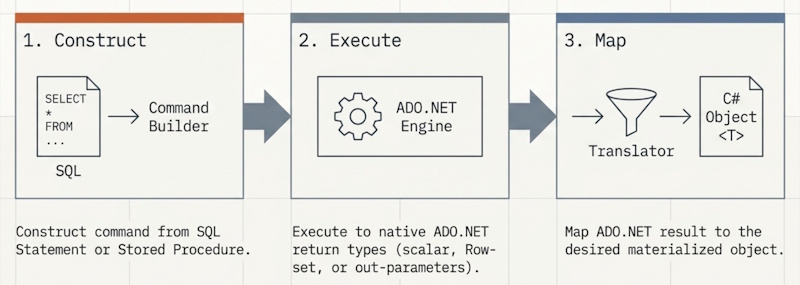
- first step is to construct the SqlCommand (here we build a SQL statement to get data from MyTable where the type matches the input parameter)
- second step is to execute the command (here we are calling ExecuteAsync(sqlCmd))
- final step is what to do with the stream of data that comes back. (.ToListOf
() here we are converting the data reader into .NET objects; as the mapping is 1-1 it is easy)