⚡ Quick Start
Get up and running in your .NET project in under 2 minutes:
1. Install Package that matches your target database
Choose the package for your database:
| Database | NuGet Package | Install Command |
|---|---|---|
| SQL Server | CA.Blocks.SQLServerDataAccess | dotnet add package CA.Blocks.SQLServerDataAccess |
| Sqlite | CA.Blocks.SqliteDataAccess | dotnet add package CA.Blocks.SqliteDataAccess |
| Postgres | CA.Blocks.PostgreSQLDataAccess | dotnet add package CA.Blocks.PostgreSQLDataAccess |
| MySQL | CA.Blocks.MySQLDataAccess | dotnet add package CA.Blocks.MySQLDataAccess |
| ODBC | CA.Blocks.OdbcDataAccess | dotnet add package CA.Blocks.OdbcDataAccess |
2. Choose how to resolve your connection strings:
| Method | Resolver Class | Extension Package |
|---|---|---|
| appsettings.json | JsonConfigGetConnectionStringResolver | CA.Blocks.DataAccess.Extensions.Config.Json |
| Environment Variables | EnvironmentVariableConnectionStringResolver | (Built-in) |
| In Code | HardCodedConnectionStringsResolver | (Built-in) |
| app.config | Custom using ConfigurationManager | (Built-in) |
| custom | IDataAccessKeyToConnectionStringResolver | (Built-in) |
3. Glue up your data access with the provider and configuration
SQL Server Example using Json config
1) Setup you configuration value in the appsettings.json file:
{
  "ConnectionStrings": {
      "MyDbConnection": "Server=(localdb)\\MSSQLLocalDB;Integrated Security = true"
  }
}
2) You create you data access class as inherit form the provided SqlServerDataAccess class. You glue up the configuration value pointing to the “MyDbConnection” Key
public class MyDataAccess : SqlServerDataAccess
{
    public MyDataAccess(IConfiguration configuration) : base (
            new DataAccessConfig(
                new DataAccessConfigOptions { ConnectionStringKey = "MyDbConnection" },
                new JsonConfigConnectionStringsResolver(configuration))
        )
        {
        }
     ...
    // your code goes here
    ...
}
3) You can now write you data access methods The methods follow the same pipeline 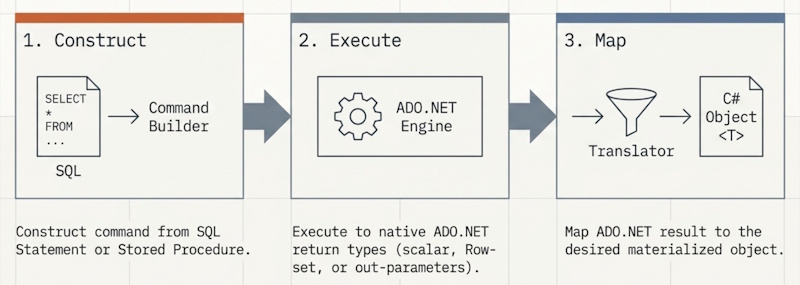 1) you construct the command from a SQL statement or stored procedure 2) you Execute or execute async the command 3) you then map the results into desired materialised objects
 // Example method to get a IList<MyModel>
 public async Task<IList<MyModel>> GetAllAsync()
 {
     var cmd = CreateCommand("SELECT * FROM MyTable");
     // Step 1 construct the command ^^^^
     return await ExecuteAsync(cmd).ToListOf<MyTableModel>();
     //           Step 2 ^^^execute async
     //                             Step 3 ^^^^ map the row set to a list of MyTableModel
 }
Next Steps
Now that you have the basics down, explore the modular power of the library:
- 🏗️ Architecture & Design — Learn about the “Pluggable Building Blocks”.
- 📦 Package Reference — See all available database providers and extensions.
Table of contents
- App Config Connection Strings Resolver
- Custom Connection String Resolver
- Getting Started with MySQL
- Getting Started with PostgreSQL
- Getting Started with SQL Server
- Getting Started with Sqlite
- Json Config Connection Strings Resolver
- Setting up connection strings
- Simple Connection String Resolver
- Using Environment Variables